Request to Revoke an Accidentally Exposed OpenRouteService API Key
Hey, please contact us as mentioned here: HeiGIT Account Best regards the openrouteservice team
Posts from every feed QUEST has found across the web — blogs, news, podcasts, channels and more.
Hey, please contact us as mentioned here: HeiGIT Account Best regards the openrouteservice team
Subject: Request to revoke an exposed API key Hello OpenRouteService Support Team, I accidentally exposed my Basic API key while setting up my academic Android application, CommunitySense. My dashboard does not allow regeneration because the key is less than one week old. Could you please help me revoke the exposed key or provide a secure replacement? Thank you.
same pattern here with newer streets falling back to locality at 0.6, so the bonte specht example rang a bell. curious to see whether nominatim keeps the confidence scoring similar once it lands.
Much appreciated for the response. We will keep an eye on the news regarding openrouteservice switching over to Nominatim! This thread is solved right now as far as we’re concerned.
Hey, unfortunately, the data in Pelias is indeed quite outdated and we are not looking to update it. This is due to our planning to move away from Pelias and towards Nominatim as a geocoder. Expect news on this in the next 2-3 weeks Best regards the openrouteservice team

Hi, We use the ORS geocoding API (/geocode/search) for addresses in the Netherlands. We regularly get confidence: 0.6 with match_type: "fallback" and layer: "locality". In these cases the address can’t be found and only the town is returned. We looked into one example, and it looks like the street is missing from the geocoding index rather than the query being parsed wrongly. Example: Bonte Specht 28, 5251 MW Vlijmen, Netherlands Free-text search: GET /geocode/search?text=Bonte Specht 28,…
Hi, Thank you for the explanation and guidance. We have since successfully authenticated with the API and received HTTP 200 responses for both geocoding and driving-car directions. Route calculations are now working in our integration, so the API access issue appears to be resolved. Thank you also for confirming the Playground session-transfer issue. I understand that you are working on a fix and that, in the meantime, I can copy the full API key using the Copy button in the Account Dashboard…
one more thing worth checking, since its going through a supabase edge function, is how the key is sent in the authorization header. ors expects just the key on its own, not bearer plus the key, and a lot of http clients add bearer by default, which would give a 403 even with a good key.
Hey, regarding the first problem, due to the php issue, we had to take down the ORS website for a while. In doing so, we restructured the playground and are working to fix this issue. In the meantime, you can copy your key from the dashboard manually to the playground. Regarding the second issue, 403 - Access Disallowed issues mostly stem from improper usage of the API key. Please make sure that you only copy your API key from your Account Dashboard at account.heigit.org. To do so, please use…
Hello, I created a HeiGIT account on 8 November 2026. My account displays a Basic Key and available OpenRouteService quotas. I am experiencing two problems: Opening API Playground from my account displays: “Login failed! The session from account.heigit.org couldn’t be transferred.” This occurs in both Safari and Chrome on macOS. Requests using my Basic Key in the Authorization header return HTTP 403: “Access to this API has been disallowed.” The following endpoints were tested:…
Dear users, maintenance is done. All systems are back in operation. Best regards, the openrouteservice team
Dear users, maintenance on the main Servers is done. All systems should be back in operation. Maintenance will continue on this forum. Best regards, the openrouteservice team
Hey, the short answer is 1 - Yes, 2 - Yes, 3 - No. Most issues regarding 403 - Access disallowed stem from improper copy-pasting of the API key. Please make sure that you only copy your API key from your Account Dashboard at account.heigit.org. To do so, please use the Copy Button next to your API key. Do NOT copy the shown string with the asterisks. When used, your key should: Start with the characters shown in the dashboard (usually “ey”) End with the characters shown in the dashboard…
Hello HeiGIT Team, I am integrating OpenRouteService Directions API into my React Native Expo application (KaamWala). I recently migrated from the old API endpoint to the new HeiGIT endpoint as instructed: https://api.heigit.org/openrouteservice/v2/directions/driving-car/geojson However, every valid POST request returns HTTP 403 Forbidden. Here are the details: API endpoint: api.heigit.org/openrouteservice/v2/directions/driving-car/geojson Method: POST Authentication: Authorization header with…
I agree with this assessment. The tag oneway=yes denotes a one-way in the direction of digitalization. This direction of digitalization is also the ordering of the nodes of the way. These are Node: 1834399624 | OpenStreetMap and Node: 1834399626 | OpenStreetMap, in this order, which means the road is digitalized into the roundabout instead of out of it. Best regards
I still think the issue is caused by the wrongly mapped roundabout exit 1462518980. This forces the routing algorithm to take exit 1462518977 towards the east and then service road 1420144851 towards the south which probably has a much lower driving speed limit. This is also the way taken in @jschnell 's screenshot.
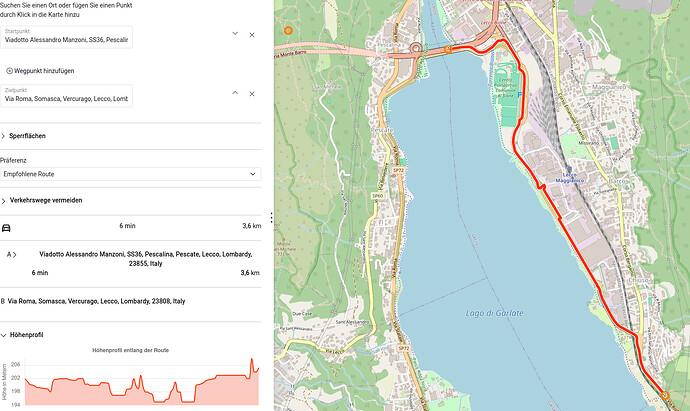
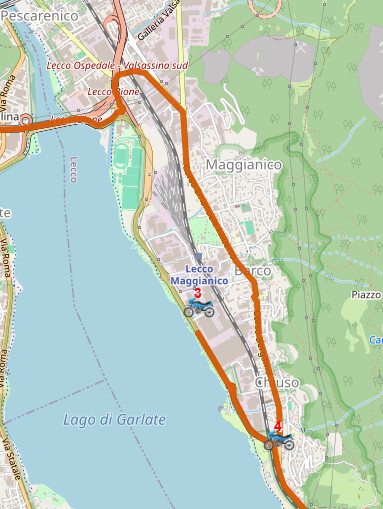
Okay, let me explain more clearly: the correct route is the one marked in blue, while the orange one goes through the town center and is the wrong way. and in google maps is correct Regardless of the traffic, the route is always plotted incorrectly.from 45.838497284783664, 9.395543500435638 to 45.8141611268768, 9.423344718711562
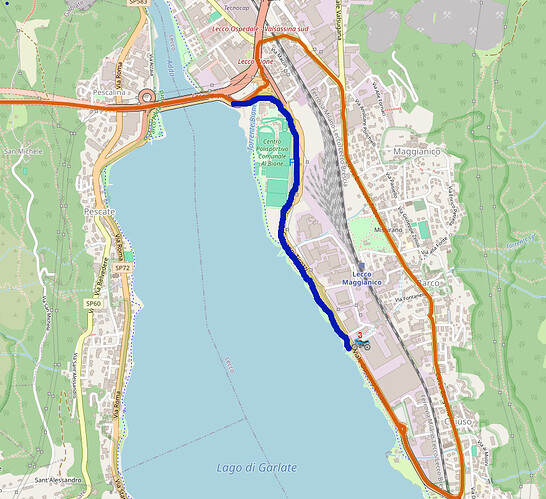
Hey, sorry, but I find it rather hard to figure out what the problem is exactly. I also do not understand where the bicycles 3 and 4 come from in your first screenshot. Could you provide a minimal example of starting and end coordinates, as well as a screenshot from routing.heigit.org showing the route? Could you also link to the OSM way that is not being used? As far as I can tell, this is doing what I’d expect it to: Best regards
Hey, please have a look at the forum, especially here: Free plan in an app with a paid tier: license (CC-BY-SA 4.0), personal data and attribution questions Also, check our ToS at HeiGIT Account, our plans at HeiGIT Account and the following post regarding deprecation: Deprecating "api.openrouteservice.org" in favour of "api.heigit.org" Best regards
Hey, yes yes no no Would you mind sharing your full request, ideally in cURL-format (API key redacted)? These things are notoriously hard to debug without knowing what exactly was requested. Also, could you share the full response you got, ideally including X-… headers? Best regards
I am talking about the web-demo. It was very handy to demonstrate the effect of different settings.
Hello HeiGIT team, I operate a free US relocation-cost planning website that may later earn affiliate commissions. Before integrating the hosted driving-directions API to improve route-distance estimates, could you please confirm the current terms for this use case? 1. Is use of the Standard plan permitted on this free public website if it may earn affiliate revenue? 2. What exact attribution text and placement are required for displayed driving distance or derived estimates? 3. May the…
Hello HeiGIT / openrouteservice Support, I am testing Directions requests on api.heigit.org with an existing API key. Test date: 2 November 2026, approximately 14:24 PKT (UTC+05:00). Both of these requests returned HTTP 404: POST https://api.heigit.org/openrouteservice/v2/directions/driving-car POST https://api.heigit.org/openrouteservice/v2/directions/driving-car/geojson Requests use: Authorization header containing the API key Content-Type: application/json Coordinates in [longitude,…
Yes, but if you check the exit carefully, there is a one-way system in the correct direction—towards the point shown in images 1 and 2—yet it keeps directing you into the town center instead of along the outer road, as shown in the images.
It looks like way https://www.openstreetmap.org/way/1462518980 is mapped as a one-way in the wrong direction, so there is no usable exit out of the roundabout towards the south.
Are you talking about the web-demo or the API? On the API-side everything should work as before and it became more flexible through custom models.
The new service on openrouteservice for wheelchair is definitively not as good as the version before: It is no longer possible to set indidual parameters like steepness, surface, smoothness that distiguished this router from all others. Also the possibility to see the properties along the route is no longer supported. I hope the possiblilities of the old version comes back soon!
I would like to report an issue with the route calculation; as shown in the screenshot, the path is incorrect—it generates a route, but the main road is not included in the calculation. zone Caloziocorte BG IT 45.830541555253674, 9.408864847471177 street correct in google maps but not correct in ors Hello, I found a routing anomaly near Lecco, Italy. Location: 45.827070, 9.411375 The road section on SP639 is fully accessible and has been physically verified. Both OpenRouteService and OSRM…
Thank you for fixing the service. In the meantime I tried to use overpass.api. But it did not work very well. Can I contact you directly, if I have problems in the future. It is because I use the openpoisservice in my free app “Trip4You-Maps” for route planning and navigation and some users like it to use the functions to show the POIs on the map. Thank you again, Gerhard Rock
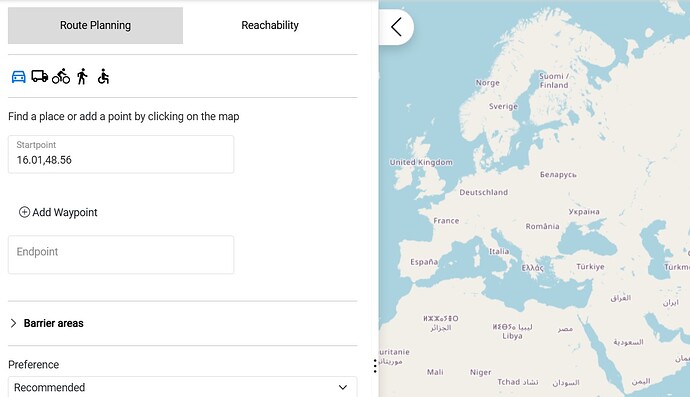
I’m not really sure how coordinates should be supplied to fields like “Startpoint” and “Endpoint”. Since it is not possible to use url parameters (see here), we let the users copy coordinates to the clipboard s.t. they can paste the coordinates into “Startpoint” and “Endpoint”. However, we are not sure if “lat,lon” or “lon,lat” should be provided. Both kind of works, but in a weird way. If I copy “16.01,48.56” (without quotation marks) to a field like “Startpoint” and click outside of the field…