Ubuntu Matrix homeserver: Upgrade and Downtime
The upgrade is complete. The Ubuntu Matrix homeserver (Synapse) is now on the latest stable release, with the workload moving from version 1.139.0 to 1.146.0. Thank you.
Posts from every feed QUEST has found across the web — blogs, news, podcasts, channels and more.
The upgrade is complete. The Ubuntu Matrix homeserver (Synapse) is now on the latest stable release, with the workload moving from version 1.139.0 to 1.146.0. Thank you.
It’s just the normal repo, and there its currently tag 7.3.0-jg-5. the build support lives in debian.*, the build scripts are release.sh and rebuild.sh. For the same config, but non-ubuntu packaging its devbuildconfig.sh, followed by make bindeb-pkg.
@glathe could you share your build recipe/script for your google drive kernels? I want to build from this repo that you mentioned earlier, for my Slim 7x (2024) github.com GitHub - aruhier/linux-slim7x-x1e: Kernel branch for the WoA Slim 7x 2024 (X1e) Kernel branch for the WoA Slim 7x 2024 (X1e)
Triage of changes on 2026-11-{01,02,04} Launchpad LP #2172712 net-tools — ifconfig reports zero RX/TX statistics for valid 15-character interface names a… A valid uncovered corner case from a bug fixed in a previous version. I suggested reporting upstream, and mentioned we still need a reproducer against the real package (as the provided reproducer makes sense, but uses a quick script). server-todo for the further investigation. LP #2172904 libvirt — pasta is not allowed to receive signals from…
Triage of changes on 2026-10-{14,26,27,28} Launchpad Old (5 items) LP #2165733 sssd — KRB5CCNAME environment variable set to wrong value As this is configuration related, I asked for the user’s krb5.conf and sssd.conf files, and marked the bug as Incomplete. LP #437783 postfix — postfix update-libc.d script tries to copy resolv.conf onto itself. This is al… Marked Invalid for postfix, for the versions in current supported releases doesn’t even ship the same files anymore. LP #2165736 chrony —…
@et-ducky Bravo! That was the needed configuration! I opened on our firewall: NTP NTS port 4460 tcp accept IPL’ed the Dell Precision M4400 laptop, logged in, and see the correct time! Checking the log, I see it successfully negotiating time synchronization. I am thankful,
Hi @Wild_Man, I’m happy to start the process whenever you are ready.
@ahonorat In PM we tested unbinding and re-probing all 11 devices together, and both s1 (+13.4s C10, +12.7s S0i3.0) and s2 (+13.0s C10, +12.4s S0i3.0) reached full deep sleep - with s2 doing it via a simple unbind/re-probe after s1 without pm_test=devices. So now you can use this shorter script (no reboot needed between runs): sudo bash << 'EOF' DEVS="00:12.0 00:04.0 00:0d.0 00:0d.2 00:14.0 00:14.3 00:15.0 00:15.1 00:16.0 00:1f.3 00:1f.4" for d in $DEVS; do [ -e…

Chrony on 26.04 uses NTS by default. NTS starts with a key exchange on TCP 4460 before any time packets go out on UDP 123. systemd-timesyncd sends plain NTP on 123 only. Ubuntu’s chrony page lists both ports (https://ubuntu.com/server/docs/how-to/networking/chrony-client/). Does the firewall allow outgoing TCP 4460?
No such section will be added. Why? Because is the very top of this topic is the following… If you have questions about UEFI Secure Boot, please ask them in our Support and Help section

Good suggestion et-ducky, So chrony is getting lots of “time out” errors int that log. I checked my firewall, NTP port 123 is accepted on both TCP and UDP. What could chrony be doing differently than systemd-timesyncd in this regard? I am thankful,
Test the GTK 4 renderer before blaming the GPU or nouveau, since Files, Settings, and Tweaks are all GTK 4 apps. Close Files, then start it from a terminal with the GL renderer. GSK_RENDERER=gl nautilus If the Files window stays readable after you switch between windows for a while, make the GL renderer the default for your session. Create ~/.config/environment.d/gsk.conf with this line, then log out and back in. GSK_RENDERER=gl If Files still shakes with gl, test it with GSK_RENDERER=cairo…
I want to endure UEFI secure boot is enabled. This install process does not even mention UEFI Secure boot. Without UEFI Secure boot enabled I do not consider Ubuntu to be installed. Please could you add a section on how to enable UEFI Secure Boot and verifying whether it is working correctly.
Hi folks, sorry for reopening the thread. I saw the other thread @ndyer linked but I don’t think it helps resolve the confusion. In my case, I just installed canonical k8s and got that warning. I think this can be a big deterrent for new users if the first thing they see after installing a snap is a warning, without understanding what they’re being warned about or being able to address it. I understand the logic mentioned in the other thread about avoiding users setting data that contains…
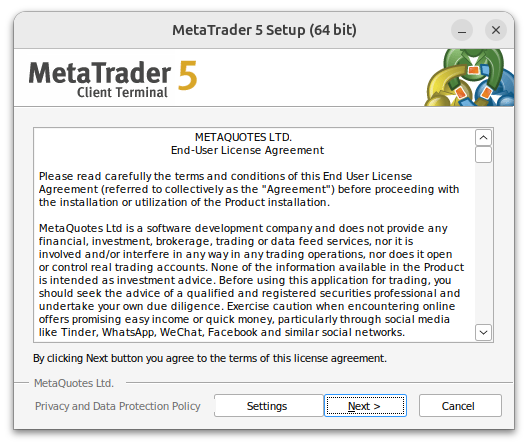
To assist, I thought I’d try installing MT5 on my Ubuntu 24.04 laptop. It worked perfectly, as per the instructions that @celticwarrior posted above. There was a step to install Mono libraries, which worked fine, then the actual installer started, and finished fine.
I vaguely remember. This should work, it needs to be on the ISO though. I will add it to the next ISO.
You also need to provide information on which Ubuntu version you are using and your computer specifications. The more you tell the volunteer users here, the easier it will be to offer advice.
Welcome to Ubuntu Discourse Great story and a great journey. Here is a link to find out more about contributing to the community and projects in general: https://ubuntu.com/community/docs/contribute

Hi everyone! I ‘m Dahli. I tend to find myself at the bottom of yet another 3am AI engineering spiral. I’m sure most if not all of us can say they’ve at least visited a time or two. No, but really, I’m from CT USA I’ve been using Ubuntu now consistently for about 6 or so years, my late fiancé got me into Linux in general and was a huge Kali fan, but I found myself at home here with you beautiful fellow Ubuntu users. I came here looking for some inspiration on future endeavors and to maybe make…

glathe: however I have found this was mentioned https://github.com/maydeafmute/dell-inspiron-14-5441-dtb by someone, edited grub config with devicetree /dell-inspiron-14-5441.dtb but it didn’t work for me might be bios recent update of DELL broke it ! but couldn’t find any step by step to build my own device tree (dts) to include during boot I might get luck with it .

First thing to understand: The software is for Windows. It may or may not run in Linux with WINE, an emulator of sorts. Their support says it can be used: https://www.metatrader5.com/en/terminal/help/start_advanced/install_linux Have you followed the aforementioned instructions? If so we need to see the FULL resulting messages, errors or otherwise, to start understanding what might have happened. Again, no guarantee whatsoever. Ultimately you’ll have to contact the developers.
The flash drive with Kubuntu on it is a live system which is designed to use as an installer as well asto ‘test’ the system. When you do install it on the SSD, it will be a lot faster than on a flash drive so you can experiment with that to learn a little. It is curious that you were able to access and view information on the Kubuntu drive using parted from the Kubuntu iso but not from grub. Is Kubuntu on an internal drive? Did you check the connections/cable for that drive to verify they are…
Hmm interesting. I honestly didn’t check the S15 dt when rebasing onto unbuntu-qcom-x1e for this one, so def not impossible. Is it still there yet on 7.3.0-jg-4? This one has the stonking repo as base.
Hi @zt34 well, the hack in this case would be to generate a dell 5441 device tree There is none yet. I can derive from the -7441, however you would either need some ISO-changing skills or get the boot option (which may not work, because I can’t test it here) with the next extended ISO.
