C
Hi @SailReal, I bought the full version of Cryptomator for Android through the Google Play Store and would like to exchange it for a license key, so I can use the F-Droid / website version instead. I have my Google Play order number and receipt ready and can send them to you. I’ve already emailed support and replied to an earlier forum thread but haven’t heard back yet, so I’m opening a new topic in case those got missed. Thanks for your help, and for maintaining Cryptomator! 1 post - 2…
C
Hi all, I’m on Cryptomator for Android 3.0.0 on a Samsung Galaxy S25 Ultra. I can unlock my vaults fine inside the Cryptomator app, but they don’t show up anywhere else on the phone. What I’ve checked: The vault is unlocked in Cryptomator when I look. “Show vaults in the Files app” is turned on. I tried both a local vault and a cloud vault, and neither shows up. I tried Solid Explorer, Samsung My Files, and Google Files. When another app opens the Android file picker to open or save a file,…
C
Hi everyone, I recently updated the Cryptomator Android app from v2.1.0 to v3.0.0, and I’m facing a major storage management issue when viewing large media files (photos and videos). The Problem: • Files stored in App Data instead of Cache: In v2.1.0, whenever I opened photos or videos from my vault, the temporary decrypted files were stored in Android’s system Cache section. I could easily free up space via Android App Info > Storage > Clear Cache without losing my settings. • Bloated App Data…
C
Open and save encrypted files right inside any app: with Cryptomator for Android 3.0.0, the most-requested feature of our Android app is here. This is a companion discussion topic for the original entry at https://cryptomator.org/blog/2026/11/19/android-document-provider-release/ 4 posts - 4 participants Read full topic
C
A critical vulnerability in OpenJDK known as Java4Shell (CVE-2026-114938) has been disclosed, and the German Federal Office for Information Security (BSI) has issued a warning. Since parts of our software are built on Java, we have reviewed all products and our entire infrastructure. This is a companion discussion topic for the original entry at https://cryptomator.org/blog/2026/11/18/java4shell/ 1 post - 1 participant Read full topic
C
When I am in a regular (Non Vault) folder and right click on a highlighted file, I have an option to “Shred Using AVG”. In a vault folder where I highlight a file and right click, this option does not appear. Is there anyway to turn this option on? 9 posts - 3 participants Read full topic
C
Hi everyone, I’m unable to launch Cryptomator on one of my Windows computers. When I open it, it briefly appears and then disappears. Its process also appears briefly in Task Manager before disappearing. No error message is displayed, and it does not remain in the system tray. Environment Affected computer: Windows 11 Cryptomator: Latest version downloaded from the official website What I have tried Reinstalled the app. Installed the latest available Windows updates after reading reports that…
C
Can a Cryptomatic vault be setup to allow anyone, ie general public, to upload a file to the a vault? IE we have to maintain a picture of peoples passports. So, we need anyone to have the option to upload a picture of their passport to a vault which keeps it encrypted and only the owner of the vault is allowed to see it? Note: it would be preferable that the upload function is part of our website and the person uploading the file does not see the Crypomatic application as our application would…
C
The app hasn’t opened since 11/12/26. I’ve reinstalled it, and the latest version was already installed. It connects to OneDrive, but my previous vaults aren’t displayed. (Everything works normally on my Windows 11 PC.) I cleared the cache, including for Microsoft Authenticator and the OneDrive app. Addition: Problem solved: Samsung’s aggressive battery management (Device Care) frequently puts Cryptomator or your cloud sync app into “Deep Sleep” after a few days of inactivity. Solution:…
C
I run my own Nextcloud instance on my own hardware and domain. I’d like to be able to have my local PC data automatically backed up to my NC instance but it needs to be encrypted. I know I can create (for example) a new vault on my desktop, leave it unlocked, copy my data to it and sync it with NC so any changes get uploaded automatically. The only concern with doing that is that on my PC I’m duplicating all of that data (normal home/documents folder and also the Cryptomator vault). Seems like…
C
Hi all, I’ve been using Claude Code in terminal on my Cryptomator-encrypted E-drive folders successfully over the past few months, but in recent weeks it suddenly stopped working. Whenever I launch Claude Code in terminal from project folders on my E drive, I see this error: “Error: The working directory no longer leads where it did when this call was permission-checked (it was deleted, a part of its path was replaced, or it can’t be examined), so the call was not run. Make the call again to…
C
Hey folks, Wanted to share a quick workflow note and check if others handle client confidentiality similarly. At our prepress and vector desk (Orbit Design Lab), we frequently handle unreleased consumer product packaging, seasonal retail displays, and NDA brand assets before public product launches. Storing active production work inside Cryptomator vaults synced to cloud storage gives us solid client-side encryption without disrupting daily syncing. One tip we found helpful for large…
C
Running Cryptomator 1.19.6 with fuse-t 1.2.9 on a MacOS 27.2 Whenever I open an Excel file, which was encrypted by Excel, from the Cryptomator folder, Excel gives an error message that the file can’t be opened. The file size changes to 2k and is corrupted and can’t be opened again. This did not happen in the past and happened after updated to Fuse-t 1.2.9 Any solution? 2 posts - 2 participants Read full topic
C
How can I use Cryptomator cross-platform Linux-Windows ? I have already encrypted folders with Cryptomator on Windows 10. Now I want to decrypt them with Cryptomator on Linux Mint 22.3. I don’t see any option on Cryptomator-Linux to open those folders. Update: Thanks, but I have resolved this. 2 posts - 2 participants Read full topic
C
Hello, totally new here. Is it possible to stream videos from an Cryptomator encrypted shared folder tree on my NAS with a media streaming client on Android basis with KODI? So accessing the files directly over the Kodi app under Android? Thanks in advance. 4 posts - 3 participants Read full topic
C
There are not one, but two new betas. One brings a feature many of you have been asking for. The other makes using Cryptomator on your Mac a whole lot easier. Before both land in stable releases, you can test them now and share your feedback. This is a companion discussion topic for the original entry at https://cryptomator.org/blog/2026/10/30/beta-document-provider-fskit/ 1 post - 1 participant Read full topic
C
I searched but didn’t find an answer on this. Perhaps I missed it. Anyway, when are file changes (adds, deletes, etc.) committed to an open Cryptomator vault? For example: I have a vault open and paste some files into it. Does Cryptomator update the vault immediately or does it not do that until the vault is locked? 3 posts - 3 participants Read full topic
C
Hello everyone I have tried Cryptomator on and off with Nextcloud in the past, hosted and self-hosted, but never committed to it because I read about stability issues due to the use webdav and the flakiness of both Apples’s and Nextcloud’s implementations . Are these still an issue nowadays or does Cryptomator work reliably with Nextcloud? Regards, -Patrick 6 posts - 5 participants Read full topic
C
I’m using Cryptomator for local file encryption and noticed I can view data from files which are supposed to be encrypted. You can replicate this with the following steps: Create a local vault (Other File Provider > On My iPhone) Unlock vault and upload an image to the vault Lock the vault Open the vault from Files, you will see the photo and file name (at least for a moment before you’re prompted to unlock the vault) I’m not sure if it’s the full file data or just the thumbnail and name,…
C
I tried to store some excel files in a cryptomator file on Onedrive and then open that file on my android phone. I had the Full Version but on Android Excel warns that the file is read only, and needs to be saved elsewhere. I need them opened for read and write, not read only. On the PC i don’t have that issue. As they contain sensitive information, just storing them in the cloud would not suffice. I read some old topics that file access in Excel or Word was an issue, but is that still the…
C
We have released Cryptomator Hub 2.1.3, which fixes a vulnerability in the Emergency Access feature. Only vaults with Emergency Access set up are affected. All other vaults are not affected. This is a companion discussion topic for the original entry at https://cryptomator.org/blog/2026/10/22/hub-emergency-access-vulnerability/ 1 post - 1 participant Read full topic
C
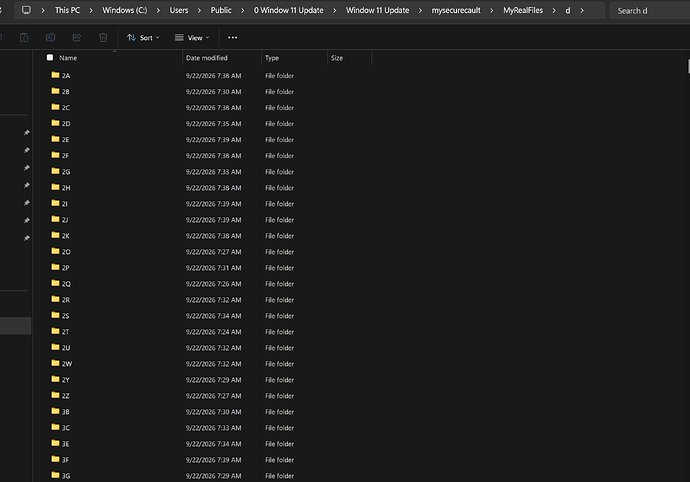
i Don’t know how to explain this because my english is bad , i have a Big issue i download cryptomator on my window 11 to protected my 102 GB Dta folder i moved that folder to C/users/public with the folder name Window 11 update then i protect the folder using cryptomator sofware with Password ( No Recovery keys etc ) Just Password ) it sucessfully protected then i turn off my laptop when i came back That Protected D drive which appear during protection disappeared and i have now only these…
C
I’m on ArchLinux. I downloaded AppImage and set it executable. Before starting AppImage file, I created the following two directories, at the same level of AppImage file, named <AppImage>.config <AppImage>.home to use them in conjunction with AppImage file, respecting AppImage documentation. I noticed your AppImage doesn’t consider them, instead it creates its settings.json file inside ~/.config/Cryptomator folder. This behaviour is unexpected and far from AppImage standards. Don’t you agree? 8…
C
Hi, Today i realized i can’t write into exiting vault on pcloud , tried from mac cryptomator client. I testd using ios client, no such issue to the same pcloud vault. initially i thought it’s pcloud mac issue, thus i downgraded to earlier verision 4.1, same issue, wondering if any other user facing similar issue? i can create new vault on pcloud with the cryptmator mac and able to write with no issue. only existing vaults are in read only when accessed from mac cryptomator. /cryptomator mac…
C
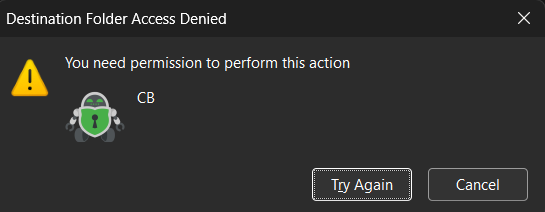
I’ve just started getting the following error when trying to copy a file to an unlocked folder, or create a folder. I’ve restarted my PC to no avail. Thanks in advance! 13 posts - 3 participants Read full topic
C
What happens if you forget your password? Is there a way to recover it? If not, it might be better not to use an app like this. It’s too big a risk. מה קורה אם שוכחים את הסיסמה? יש דרך לשחזר אותה? במקרה שלא אולי עדיף לא להשתמש באפליקציה כזאת. זה סיכון גדול מדי 2 posts - 2 participants Read full topic
C
Every October, Europe turns its attention to cybersecurity. Through European Cybersecurity Month, the European Union Agency for Cybersecurity (ENISA), the European Commission, and numerous partners work to raise awareness of digital risks. The campaign’s core message is as simple as it is far-reaching: Cybersecurity is a Shared Responsibility. This is a companion discussion topic for the original entry at https://cryptomator.org/blog/2026/10/02/european-cybersecurity-month-2026/ 1 post - 1…
C
All through October, we’re introducing you to five monsters with a taste for your cloud files: the Phisher, the Data Thief, the Cloud Creeper, the Ransomware Monster, and the Evil Insider. They look very different — but they all want the same thing: files they can read. This is a companion discussion topic for the original entry at https://cryptomator.org/blog/2026/10/01/halloween-sale-2026/ 1 post - 1 participant Read full topic
C
Months ago I bought a lifetime license for Android and now I am ready to set up the app. I have a Pixel with Graphene OS and I don’t want to use Google Play. Which is the right solution for me? If I have understood correctly what is written in the set up guide, the apk and the Accrescent seem to be the more flexible in term of use for my situation. Am I right? Other questions: for downloading APK is required to pay for a licence, but as I have already payed for it, can I just download the APK,…
C
After I mess up with the vault by deleted old vault but copy those c9r files ( original was arw file from Sony ). So for now I only have those c9r files is there anyway that i can recover it to arw files? 1 post - 1 participant Read full topic